
Voice Agent Calls Page Behavior
This article explains how Alpharun organizes voice agent calls on the Calls page, what happens when the same caller reaches out more than once, and how to configure calls so that data extraction works the way you expect.
Default Call Grouping
By default, Alpharun groups all voice agent calls from the same phone number into a single customer interaction - one row on the Calls page. Every call that comes from that number is added to the same interaction over time.
To move between the individual calls within a customer interaction, open the interaction, go to the Transcript tab, and use the calls menu in the bottom-left to toggle between each call.
What this means for data extraction
Data extraction fields are calculated per customer interaction, not per call. When several calls are grouped into one interaction, Alpharun extracts a single value for each field by looking across all of the grouped call transcripts together.
As a result:
You will only ever see one value per field for that interaction, even if the caller answered differently on different calls.
If a later call changes an answer, re-running extraction overwrites the earlier value - there is no separate saved value for each call.
Because the model reviews every grouped transcript at once, you cannot rely on the value always reflecting a specific call (for example, always the first or always the most recent).
If each of your calls represents a distinct event you want to analyze on its own —-and especially if you rely on data extraction - we recommend splitting your calls instead. See below.
Splitting Calls Into Their Own Rows (Recommended)
If you want every voice agent call to appear as its own row - its own customer interaction - you can configure Alpharun to stop grouping calls by phone number.
To do this, create a custom field in Alpharun with the internal field name phone_number. Once that field exists, Alpharun treats each incoming call as its own customer interaction, even when multiple calls come from the same phone number.
This is the recommended setup, especially if you want to leverage data extraction, because each call then gets its own independently extracted field values instead of one merged value across all calls.
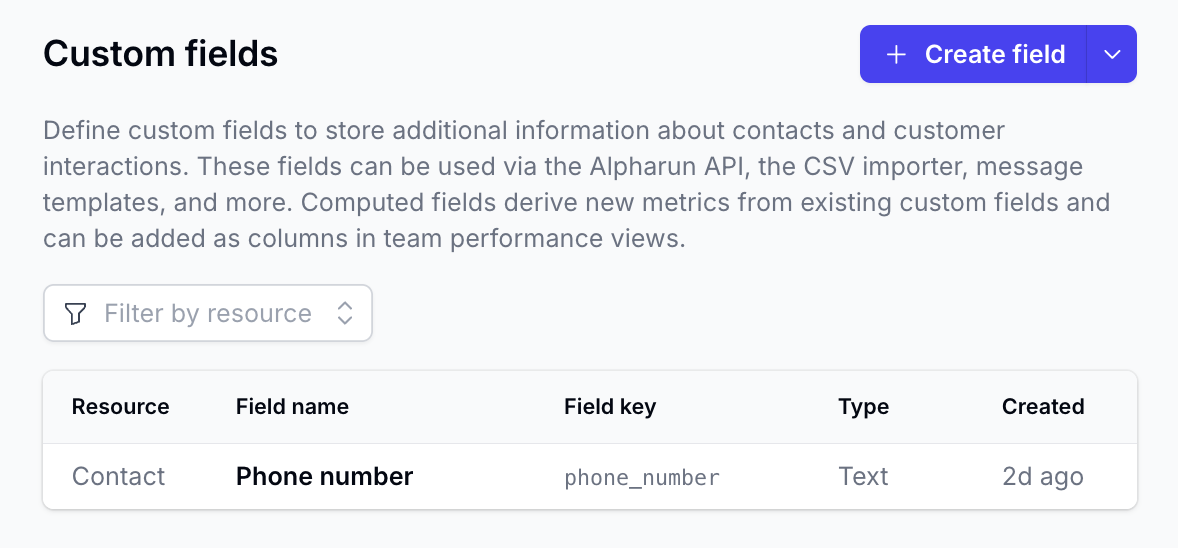
Note: This change applies going forward. Calls that were already grouped before you created the field remain grouped as they were.
Frequently Asked Questions
If I have several grouped calls, which call's answer shows up in a data extraction field? There is no fixed rule. Alpharun reviews all of the grouped call transcripts together and returns a single value, so it is not guaranteed to be from the first or the most recent call. If you need per-call accuracy, use the split setup above.
Do earlier values get saved anywhere when they're overwritten? The interaction always displays the current extracted value. Prior values are not shown in the interaction view, which is another reason to split calls when each call's individual answers matter.
Can I see each call within a grouped interaction? Yes. Open the interaction, go to the Transcript tab, and use the calls menu in the bottom-left to switch between the individual calls.
I already have grouped calls but want them separated. What now? Creating the phone_number custom field only affects calls going forward. If you need historical calls separated, reach out to Alpharun support.