
How to Install Alpharun MCP
Claude
⚠️ Installation for Team and Enterprise plans require Claude Owner or Primary Owner permissions
Preliminary steps for owners:
Navigate to Organization settings > Connectors
Click the "Add" button.
Hover over “Custom,” then select “Web.”
Add Alpharun's remote MCP server URL -
https://api.alpharun.com/mcpFinish configuring your connector by clicking "Add."
Steps for members after connector is configured:
Navigate to Customize > Connectors
Find the Alpharun connector your Owner added in the list (it will have a "Custom" label).
Click "Connect" to authenticate using OAuth and start using the connector with Claude.
ChatGPT
⚠️ Custom MCP connectors require Developer Mode, available on ChatGPT Plus, Pro, Business, Enterprise, and Edu plans (not Free). Developer Mode is web-first and still labeled beta.
Preliminary steps for Business / Enterprise / Edu admins:
On workspace plans, an admin may need to allow custom connectors before members can add them. In your workspace admin settings, find the Connected Data / Developer Mode permission and enable "Create custom MCP connectors." (Individual Plus and Pro accounts can skip this.)
Steps to add the connector:
In ChatGPT navigate to Plugins
Click Add > Add custom MCP server
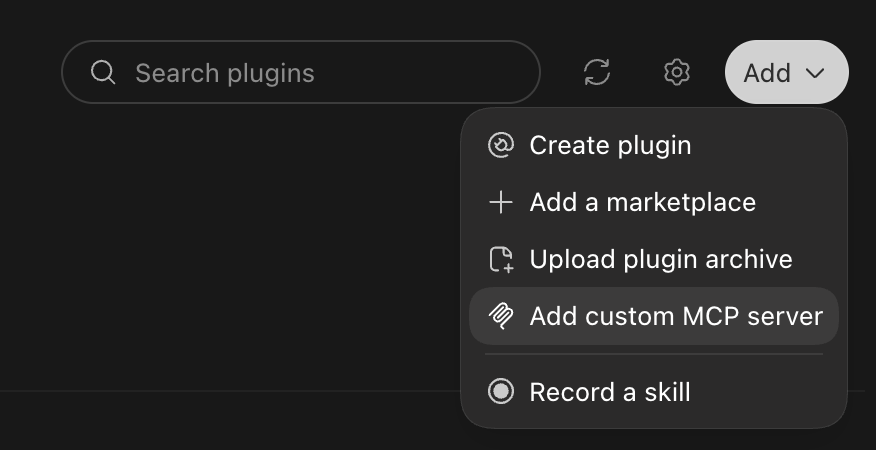
Give it a name (e.g. "Alpharun") and description, then paste Alpharun's remote MCP server URL —
https://api.alpharun.com/mcpSet authentication to OAuth, then confirm and add the connector.
The first time you use it, ChatGPT will open an OAuth popup — approve it to authenticate. Make sure popups aren't blocked.
Note: If you encounter an error in this setup process or are unable to see the 'Add custom MCP server' option, reach out to your IT team to grant you access.
Cursor
Alpharun's remote MCP server can be added to Cursor as a custom MCP server. Authentication is per user over OAuth, so each person installs and authenticates on their own - there are no owner or admin steps to complete first.
Preliminary steps for owners:
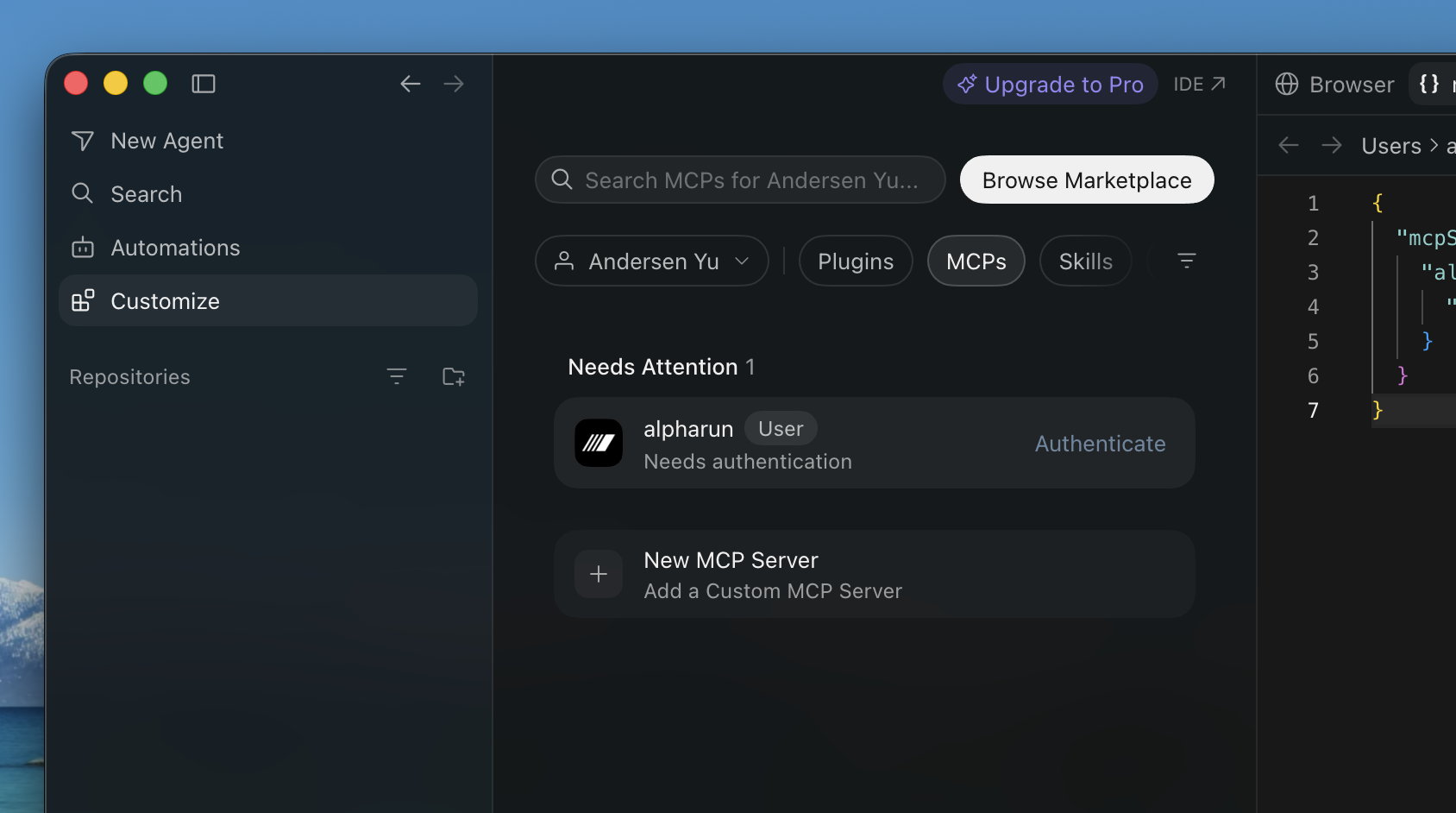
Click on Customize > MCPs > New
Add the following JSON into the mcp.json configuration file and then save
{
"mcpServers": {
"alpharun": {
"url": "https://api.alpharun.com/mcp"
}
}
}
Alpharun will appear with an Authenticate button > click it and Cursor will open a browser window for the Alpharun Oauth flow. Sign in and approve access.
Custom and server-side agents
Alpharun MCP is not limited to Claude, ChatGPT, or Cursor. You can connect it to an agent or application you built yourself, provided your MCP client supports remote servers using Streamable HTTP.
Use the following server URL:
https://api.alpharun.com/mcp
Authenticate with an API key
For a server-side or headless agent, we recommend using an Alpharun API key:
In Alpharun, navigate to Settings → API Keys.
Create an API key and copy it. The key is only displayed once.
Store the key securely in your server’s secrets manager or environment variables.
Configure your MCP client to send it as a bearer token:
Authorization: Bearer arak_…
An API key grants company-scoped access and is not associated with a particular Alpharun teammate. Never expose the key in browser-side code, source control, logs, or prompts.
A generic MCP configuration might look like this:
{
  "mcpServers": {
    "alpharun": {
      "url": "https://api.alpharun.com/mcp",
      "description": "Use Alpharun when the user asks about team performance, customer interactions or calls, transcripts, playbooks, criteria, outcomes, signals, teammates, or performance and coaching insights contained in their Alpharun account.",
      "headers": {
        "Authorization": "Bearer ${ALPHARUN_API_KEY}"
      }
    }
  }
}
Configuration syntax varies between MCP frameworks. The description field is optional and may not be supported by every client. If your framework configures tool-routing guidance separately (for example, in an agent system prompt) place the description there instead. Alpharun also supplies server instructions and individual tool descriptions through MCP automatically.
Test the connection
You can verify your API key and resolved company identity with:
curl -X POST https://api.alpharun.com/mcp \
  -H "Authorization: Bearer $ALPHARUN_API_KEY" \
  -H "Content-Type: application/json" \
  -H "Accept: application/json, text/event-stream" \
  -d '{
    "jsonrpc": "2.0",
    "id": 1,
    "method": "tools/call",
    "params": {
      "name": "who-am-i",
      "arguments": {}
    }
  }'
The response should identify the API key’s Alpharun company.
If your agent needs to authenticate as an individual teammate instead of at company scope, Alpharun MCP also supports OAuth. This requires an interactive browser authorization flow and is generally better suited to user-facing applications.
Help your agent use the tools well
Every tool includes a description that MCP clients pass to the model automatically, so no extra configuration is required. However, the initialize response also includes an instructions field with a guide to Alpharun's concepts and tools. Some agent frameworks inject this into the system prompt automatically; many custom-built clients don't. If yours doesn't, include that text in your agent's system prompt because it significantly improves tool selection. At minimum, tell your agent what the server is for (e.g. "Alpharun analyzes customer calls against playbooks; use its tools to query customer interactions, playbook criteria and scores, and teammate performance") and have it call the get-context tool first to orient itself.
Test the MCP
You can test the Alpharun MCP by kicking off a new chat with a question like "Look through the past week of calls in Alpharun and pull a list of objections that came up?"